Custom TC4: Generate a Profile with an Agent, Then Import It
Give an Agent your device's protocol information, ask it to generate a HiBean JSON profile, and import the file through Custom TC4. The Agent can prepare the fields, but you still verify the connection, readings, and any enabled controls on the actual device.
Checked against App 1.5.4+189 source on 2026-10-19. The JSON versions remain profileVersion: 1 and schemaVersion: 2; these are not App version numbers.
If HiBean has a dedicated entry for your device or firmware, use it first. The TC4 Module integration is separate from Custom TC4.
Check whether the protocol fits
Custom TC4 accepts UTF-8 text commands and numeric status frames. Fields use a fixed comma delimiter, and a Celsius bean-temperature field is required. JSON provides no temperature unit conversion. Serial, Socket, BLE, and Classic Bluetooth replies need a line terminator. A complete WebSocket message can serve as one frame.
A binary protocol, Modbus registers, JSON response objects, or a protocol requiring regex extraction or scaling formulas cannot be adapted through this profile alone. For Modbus, see Custom Modbus RTU.
| Platform | Socket / WebSocket | BLE | Classic Bluetooth SPP | Serial |
|---|---|---|---|---|
| Android | Supported | Supported | Supported | Not supported |
| iOS | Supported | Supported | Not supported | Not supported |
| macOS / Windows | Supported | Supported | Supported | Supported |
This table describes App configuration policy. Actual connectivity also depends on the OS, driver, and device. The current Custom TC4 workflow does not support Linux.
What to give the Agent
| Information | What to include |
|---|---|
| Device and software | Model, firmware, HiBean platform and version |
| Transport | IP/port, WebSocket path, or serial parameters; for BLE, the device identifier, service UUID, write and notification characteristics |
| Status protocol | Read command, command terminator, reply terminator, required initialization commands |
| Raw replies | At least one unchanged complete reply, preserving commas, empty fields, and terminators; preferably three consecutive replies |
| Field meanings | Bean-temperature position and unit, plus any other fields you need |
| Goal | Temperature monitoring only, or also manual heater, fan, drum, or cooling-fan control |
| Control information, if needed | Commands, ranges, steps, matching feedback fields, permitted test values, and safe restore values |
Manufacturer documentation, firmware source, and actual traffic are the most useful evidence. A similar model name, someone else's template, or a successful BLE connection does not establish commands or field order.
Send the following request with your device information. Also provide the linked Agent JSON Profile Reference, or copy its full contents:
Using HiBean's Custom TC4 Agent JSON Profile Reference and the device
information below, generate a UTF-8 .json file that I can import in HiBean.

My platform and App version:
Device model and firmware:
My goal (temperature monitoring / monitoring plus specific manual controls):
Transport parameters, protocol documentation, and raw replies:

Check whether the protocol fits the current profile capabilities first.
If required information is missing, list the specific gaps; do not invent
READ, field indexes, UUIDs, or safe values.
Use empty actuators for monitoring only. For controls, verify the commands
and feedback representing the same physical quantity.
Deliver the JSON, sources/assumptions, and on-device verification steps
separately. Do not put explanations, test values, device names, or proof
results inside the JSON.
Distinguish format checks from actual device verification.
An Agent can organize fields, convert formats, and check consistency. Protocol evidence and real readings must establish what the device returns and which value represents bean temperature.
1. Import and connect
Open Custom TC4 from Add Device, import the JSON template, and check the transport target on the current phone or computer. BLE identifiers and serial-port names may need reselection after changing hosts.
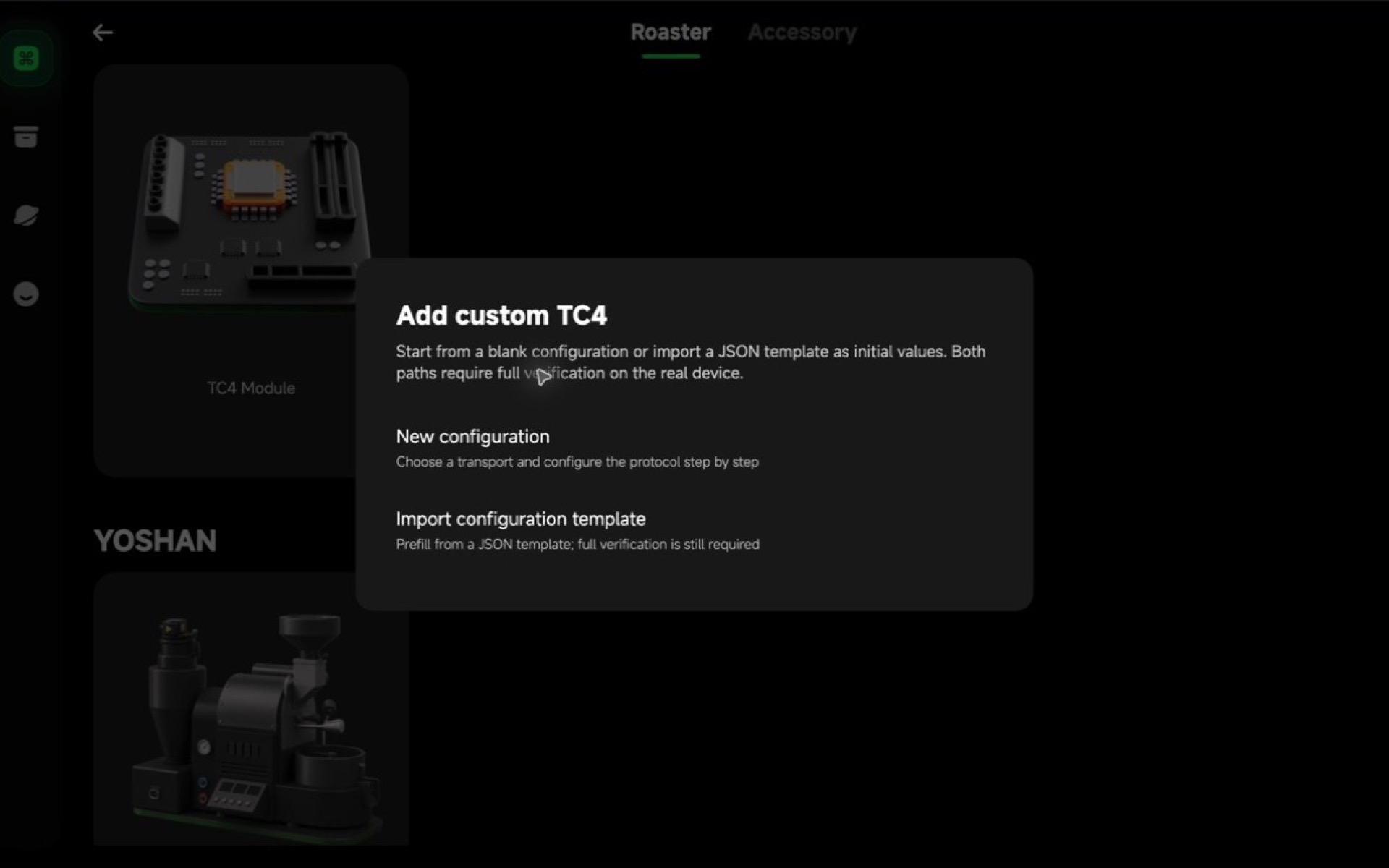
Select Connect device. This checks the transport; BLE also looks up the configured service and characteristics. Initialization commands run during the next, status-reading stage. A successful connection does not establish that status commands work.
Service UUIDs and characteristic UUIDs are different fields. Some modules use service FFE0, write FFE2, and notify FFE1, but this is not a universal TC4 convention. Use the actual service-discovery results; do not put FFE1 in the service field just because it appears in a log.
Current BLE reception uses notifications. Although the JSON allows the notify UUID to be omitted, a BLE status workflow still needs a working notification channel; the App does not automatically switch to characteristic Read operations.
2. Read and confirm fields
In Status reading, check the command, response terminator, and initialization commands, then select Read status. The App connects, sends the initialization sequence, and sends the read command.
If the actual response is 180.5,20 and the protocol says it contains bean temperature followed by heater feedback, map indexes 0 and 1. The first displayed segment is JSON index 0.
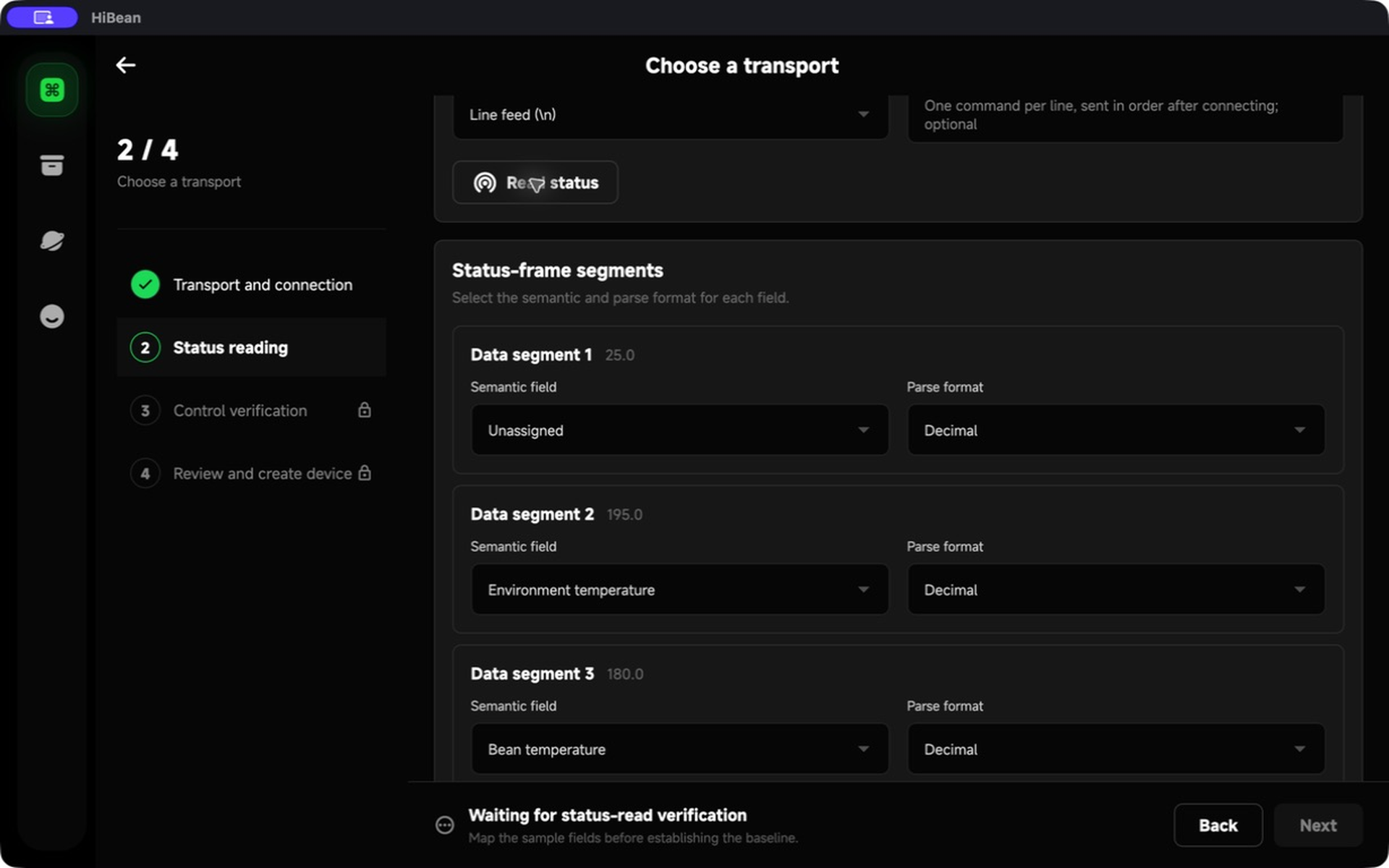
Bean temperature is required. Leave unused fields unmapped; map the matching feedback for controls you intend to enable. Complete three consecutive full status reads, each parsing every mapped field.
messageSeparator is the reply terminator. Despite its name, actuatorCommandSeparator also terminates read and initialization commands. They may differ. For CRLF, ask the Agent to write "\r\n" in JSON, rather than appending a newline inside READ.
3. Verify any enabled controls
For temperature monitoring only, leave every control disabled and continue.
For a control, enter a test value different from the safe value and run verification. The App writes the test value, reads matching feedback, restores the safe value, and reads it back. Both must match before the control is authorized. This operates real equipment, so choose the device state and values according to its documentation.
If a complete feedback value differs from the requested test value, the App attempts and verifies safe restoration, then fails the proof. If the write or readback outcome is unknown, it does not repeatedly resend commands to guess the state. Check the device before retrying.
These templates authorize verified manual controls. Automation, replay, automatic cooling, and software PID do not execute custom control templates.
4. Choose manual recording parameters
For heater, fan, or drum values without device feedback or protocol control, Manual recording parameters lets you choose units and a maximum. This records adjustments you make on the machine; it does not send commands.
An axis with device feedback or protocol control cannot also use manual recording. These settings belong to the App's device configuration and are not exported or imported in protocol JSON. An Agent must not add recordProfile to a profile.
5. Review and save
Enter the device name and confirm communication, three complete reads, every enabled control, and manual recording settings before creating the device. Import does not bypass verification.
After setup, Device Settings offers Edit configuration, Import template and edit, and Export configuration. Editing temporarily disconnects the device and requires verification again, then updates the same device. Canceling or failing an edit attempts to restore the old connection; reconnect manually if recovery fails.
Transport or protocol changes clear previous evidence. The device name and manual recording settings are outside the portable profile. A control test value is entered during verification, not stored in the JSON.
Examples and troubleshooting
See the Agent JSON Profile Reference for the complete contract and downloadable examples. Replace example addresses, identifiers, ports, and protocol assumptions. A valid format does not prove a working device. A candidate profile for one machine is not a TC4 default.
| Where it stops | Check first |
|---|---|
| Import | Complete envelope rather than config: {}; versions, field names, types, and newline escaping |
| BLE service not found | Whether the discovered service actually has that UUID; service versus notify/write characteristic |
| Connected but no status | Command/reply terminators, initialization, notification channel, and other programs using the device |
| Raw data appears but three reads fail | BT position, empty/nonnumeric fields, and whether all mappings exist in every frame |
| Control verification | Test/safe values, range/step, and feedback semantics; monitoring does not need enabled controls |
When reporting an issue, include the App version, platform, failing step, displayed error, configuration JSON, and logs from that attempt. Newer source records commands, reply previews, partial replies on timeout, and parsing failures. If an older log lacks them, “BLE connected” alone cannot establish the read result.
Images illustrate operations from a macOS Debug simulator. Text and JSON were checked against the source version above; this does not mean the screenshots or examples have passed real-hardware acceptance on every platform.